
The Area of Circle Calculator is an online geometry tool that helps you quickly compute the area of a circle using either its radius or diameter. Instead of manually applying formulas and performing unit conversions, this calculator automates the entire process in a few seconds.
Whether you are a student, engineer, architect, or technician, this tool ensures accurate results with minimal effort. The Area of Circle Calculator eliminates calculation errors and saves valuable time, especially when working on design, construction, or academic tasks.
The concept of area plays a central role in geometry and engineering mathematics. A circle is one of the most fundamental shapes in mathematics, widely used in:
Mechanical components (gears, shafts, bearings)
Civil engineering structures (columns, pipes)
Architecture (domes, round slabs)
Manufacturing and fabrication
Physics and scientific research
Understanding and accurately calculating the area of a circle is essential in these fields. This is where an Area of Circle Calculator becomes extremely valuable.
The Area of Circle Calculator uses the standard mathematical formula:
Where:
A = Area of the circle
π (Pi) ≈ 3.14159
r = Radius of the circle
If the diameter is given instead of radius, the calculator first converts diameter into radius using:
Then the same formula is applied.
The formula πr2 comes from geometric principles that relate the circumference and radius of a circle. Squaring the radius accounts for two-dimensional measurement, which is required when calculating area.
The Area of Circle Calculator automatically applies this mathematical logic in the background so users do not need to perform intermediate steps manually.
This Area of Circle Calculator allows you to choose between:
Calculation using Radius
Calculation using Diameter
This flexibility makes it useful for different scenarios, since sometimes technical drawings provide diameter instead of radius.
The calculator supports multiple measurement units:
mm (millimeters)
cm (centimeters)
dm (decimeters)
m (meters)
km (kilometers)
in (inches)
ft (feet)
yd (yards)
mi (miles)
The Area of Circle Calculator converts all values internally into meters for calculation and then converts the result back into the selected unit squared (e.g., m², cm², in²).
One of the most powerful features of this Area of Circle Calculator is automatic unit conversion.
For example:
If radius is entered in centimeters, the tool converts it to meters.
It performs the area calculation in square meters.
Then it converts the result back to square centimeters.
This ensures high precision and eliminates manual conversion errors.
The Area of Circle Calculator includes error validation:
Prevents negative values
Prevents empty input fields
Displays user-friendly error messages
This improves reliability and ensures correct data entry.
Choose whether you want to calculate using:
Radius
or
Diameter
The interface updates dynamically based on your selection.
Input the numerical value in the field provided.
Make sure:
The value is positive
The unit is correctly selected
Choose the appropriate unit from the dropdown menu.
The Area of Circle Calculator supports both metric and imperial systems.
Press the “Calculate Area” button.
The result will appear instantly with:
A precise numerical value
Correct squared unit notation (e.g., m², cm²)
You can click the reset button to clear all values and perform a new calculation.
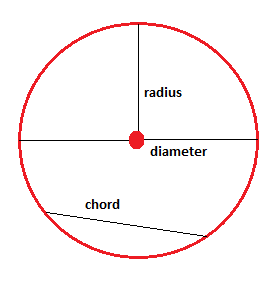
The radius is the distance from the center of the circle to any point on its boundary. The Area of Circle Calculator uses this directly in the formula πr2

The diameter is the full distance across the circle passing through the center. The Area of Circle Calculator converts diameter into radius before computing the area.
Engineers frequently use circular cross-sections for:
Shafts
Pistons
Bearings
Pipes
The Area of Circle Calculator helps determine:
Cross-sectional area
Material requirement
Load distribution
In construction, circular shapes are common in:
Concrete columns
Circular slabs
Water tanks
Sewer pipes
Accurate area calculation ensures correct estimation of material quantities.
Architects use circular designs in:
Domes
Round platforms
Decorative structures
The Area of Circle Calculator simplifies early-stage design calculations.
Students learning geometry can use the Area of Circle Calculator to:
Verify homework
Understand formula application
Practice unit conversions
Manual calculations require:
Formula recall
Squaring values
Unit conversion
The Area of Circle Calculator completes all these steps instantly.
Common mistakes include:
Forgetting to square the radius
Incorrect unit conversion
Decimal rounding errors
This tool minimizes such risks.
Since the Area of Circle Calculator uses standardized mathematical constants and programmed logic, the results remain consistent every time.
The calculator is designed with responsive layout support. It works efficiently on:
Desktop
Tablet
Mobile devices
This increases usability across platforms.
The Area of Circle Calculator internally converts all input values into meters before performing calculations. This ensures:
Standardized computation
High numerical accuracy
Correct squared unit transformation
The tool is built using:
HTML for structure
CSS for styling
JavaScript for logic and calculations
The script is encapsulated to prevent global namespace pollution, improving stability and performance.
Since calculations are performed on the client side:
No data is sent to servers
User privacy is maintained
Loading speed is fast
Yes. The tool supports units from millimeters to miles.
Yes. Inches, feet, yards, and miles are supported.
Yes. It uses precise mathematical constants and validated unit conversion logic.
Only for loading the webpage. The calculation itself runs locally in your browser.
The Area of Circle Calculator is a reliable, efficient, and user-friendly tool designed for students, engineers, architects, and professionals. It simplifies one of the most common geometric calculations while ensuring precision and flexibility across multiple units.
With automatic conversion, validation checks, responsive design, and accurate computation, this Area of Circle Calculator stands as a trustworthy solution for both academic and professional use.
If you are looking for a fast, accurate, and easy way to compute circular area, this Area of Circle Calculator is the ideal choice.